Chatbot human handoff
ChatFairy flags a chat for your team when a customer asks for a person or the assistant has no answer.
Free during the open beta. No card needed.
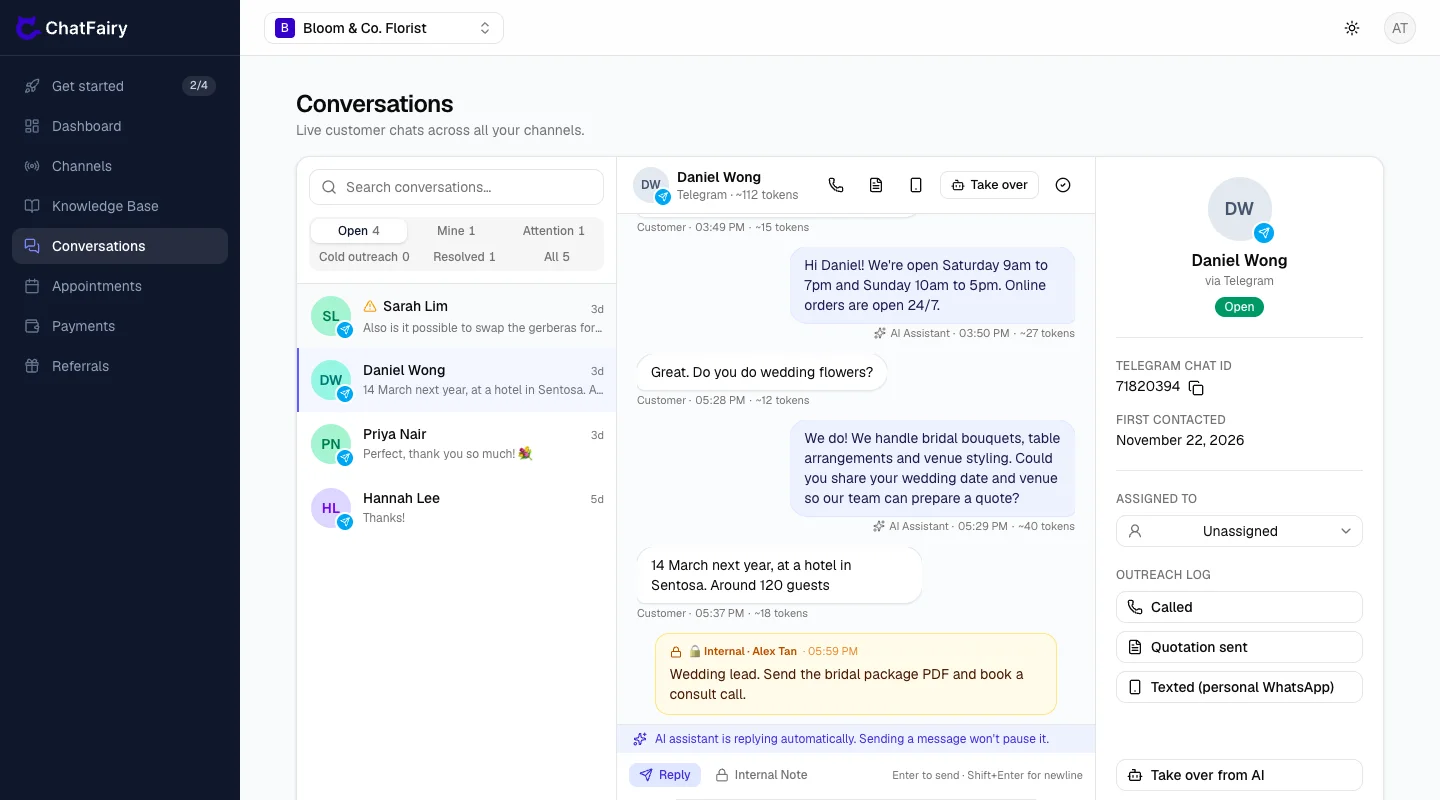
An assistant should know when to step aside. Your team takes over with the whole chat in front of them.
Triggers
In each case it tells the customer it will check with your team. It does not make up an answer to fill the gap.
- The customer asks to speak to a person.
- Your knowledge base has no answer to the question.
- The assistant has missed several times in a row.
Team view
- The conversation is flagged in the shared inbox, on the web and in the phone app.
- A push notification on your phone, for every message or only when a person is needed.
- The full chat history, so nobody asks the customer to repeat themselves.
Taking over
Open the chat
From the inbox or from the notification.
Reply
Replying pauses the AI on that conversation. Add an internal note or assign a teammate if someone else should handle it.
Hand back
When you are done, switch the AI back on for that conversation.
Your rules
Negotiations, complaints, diagnoses and anything that needs judgement belong with a person. Write those rules into your knowledge base and the assistant passes those conversations on instead of answering them.